Readme of @shortkit/debounce-throttle
18/01/2026 • 4 min read
A tiny, executor-style debounce and throttle utility. Unlike wrapper-based APIs, you call debounce(fn, wait, ...args) directly each time. The state is tracked internally via a WeakMap keyed by the function reference.
Installation
npm i @shortkit/debounce-throttle
Usage
debounce(fn, wait, ...args)
Delays function execution until after a specified wait period of inactivity. Every call resets the timer.
Signature:
declare function debounce<F extends (...args: any[]) => any>(
  fn: F,
  wait: number,
  ...args: Parameters<F>
): void
Example:
import { debounce } from "@shortkit/debounce-throttle"

const saveToServer = (data: string) => console.log("Saving:", data)

// Each call resets the 300ms timer
input.addEventListener("input", (e) => {
  debounce(saveToServer, 300, e.target.value)
})
throttle(fn, wait, ...args)
Executes the function immediately on first call, then blocks subsequent calls until the wait period expires. Fires a trailing call with the last arguments.
Signature:
declare function throttle<F extends (...args: any[]) => any>(
  fn: F,
  wait: number,
  ...args: Parameters<F>
): void
Example:
import { throttle } from "@shortkit/debounce-throttle"

const updatePosition = (x: number, y: number) => console.log("Position:", x, y)

// Executes at most once per 100ms
document.addEventListener("mousemove", (e) => {
  throttle(updatePosition, 100, e.clientX, e.clientY)
})
debounce(id, fn, wait, ...args) / throttle(id, fn, wait, ...args)
Use a symbol as the key instead of the function reference. This is useful when you need to debounce/throttle anonymous functions or arrow functions that are recreated on each render.
Signature:
declare function debounce<F extends (...args: any[]) => any>(
  id: symbol,
  fn: F,
  wait: number,
  ...args: Parameters<F>
): void

declare function throttle<F extends (...args: any[]) => any>(
  id: symbol,
  fn: F,
  wait: number,
  ...args: Parameters<F>
): void
Example:
import { debounce } from "@shortkit/debounce-throttle"

// Define symbol outside component (global scope)
const SEARCH_ID = Symbol("search")

export function SearchInput() {
  const [query, setQuery] = useState("")

  // Arrow function is recreated each render, but symbol keeps state consistent
  return (
    <input
      value={query}
      onChange={(e) => {
        setQuery(e.target.value)
        debounce(SEARCH_ID, () => fetchResults(e.target.value), 300)
      }}
    />
  )
}
State for symbol-keyed calls is automatically cleaned up after execution completes.
debounce.withOptions(opts) / throttle.withOptions(opts)
Create a customized executor with different options. Works with both function and symbol keys.
Options:
type Options = {
  leading?: boolean   // Execute on leading edge (default: false for debounce, true for throttle)
  trailing?: boolean  // Execute on trailing edge (default: true)
  maxWait?: number    // Maximum time to wait before forced execution
}
Examples:
import { debounce, throttle } from "@shortkit/debounce-throttle"

// Debounce with leading call
const debounceLeading = debounce.withOptions({ leading: true })
debounceLeading(fn, 100, arg1, arg2)

// Debounce with maxWait (guaranteed execution every 500ms)
const debounceMax = debounce.withOptions({ maxWait: 500 })
debounceMax(fn, 100, arg1)

// Throttle without trailing call
const throttleNoTrail = throttle.withOptions({ trailing: false })
throttleNoTrail(fn, 100, arg1)

// Works with symbol keys too
const id = Symbol("custom")
debounceMax(id, fn, 100, arg1)
cancel(key)
Cancels any pending execution for the given function or symbol.
import { debounce, cancel } from "@shortkit/debounce-throttle"

debounce(saveData, 1000, data)
cancel(saveData) // returns true if there was something to cancel

// With symbol
const id = Symbol("save")
debounce(id, saveData, 1000, data)
cancel(id) // returns true if there was something to cancel
flush(key)
Immediately executes any pending call for the given function or symbol.
import { debounce, flush } from "@shortkit/debounce-throttle"

debounce(saveData, 1000, data)
flush(saveData) // returns true if there was a pending call

// With symbol
const id = Symbol("save")
debounce(id, saveData, 1000, data)
flush(id) // returns true if there was a pending call
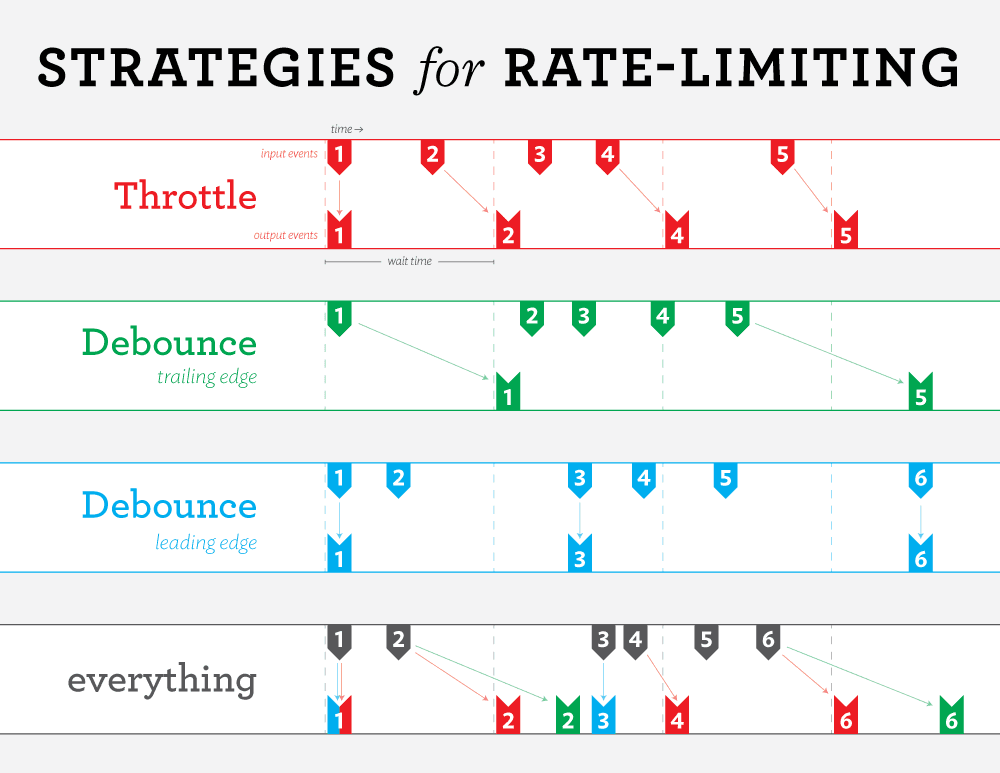
Debounce vs Throttle
| Aspect | Debounce | Throttle |
|---|---|---|
| First call | Waits (unless leading: true) | Executes immediately |
| During activity | Keeps resetting timer | Blocks until interval expires |
| Use case | Final state after events stop | Consistent updates during activity |
Debounce: Groups rapid calls into a single execution after activity stops.
Throttle: Spreads calls across fixed intervals for periodic execution.
Notes
- Function keys: State is tracked per function reference using a WeakMap and automatically garbage collected when no longer referenced.
- Symbol keys: State is stored in a Map and cleaned up after execution completes (timer expires or flush is called).
- Both
cancelandflushreturn a boolean indicating whether there was a pending call.
"Readme of @shortkit/debounce-throttle", 18/01/2026, 22:21:00